
What Is Business WiFi?
Business WiFi is a professionally designed wireless network that supports multiple users, business‑critical applications, cloud platforms, and enterprise‑grade security requirements. Unlike residential WiFi, which typically supports light household usage, business WiFi prioritizes reliability, scalability, performance under load, and centralized management.
In other words, business WiFi is not simply "faster internet." Instead, it serves as foundational infrastructure for organizations that rely on cloud software, video conferencing, VoIP systems, shared files, and secure data access. Because modern businesses depend on consistent connectivity, properly designed wireless networks play a direct role in productivity and security.
Why Business WiFi Is Different From Home WiFi
To understand its value more clearly, it helps to examine how business WiFi differs from residential systems. While many organizations begin with consumer‑grade equipment, they often upgrade after experiencing instability, security gaps, or performance issues. The difference ultimately lies in design intention.
Business WiFi is built to:

By contrast, residential WiFi equipment does not support this level of performance or oversight. Although it may function initially, it typically lacks redundancy, traffic prioritization, enterprise‑grade security, and long‑term scalability. As a result, growing organizations often encounter bottlenecks and reliability concerns.
For a deeper comparison, explore our Business WiFi vs. Home WiFi guide.
Core Components of a Business WiFi System
In practice, several integrated components work together to deliver consistent performance and security. Rather than relying on a single device, business WiFi environments use layered infrastructure.
1. Business‑Grade Router & Firewall
First, a business‑grade router and firewall manage incoming and outgoing traffic. These systems apply security policies, filter threats, and protect internal data. Unlike consumer routers, enterprise firewalls support advanced monitoring, intrusion detection, VPN access, and compliance controls.
2. Managed Network Switches
Next, managed switches connect wired infrastructure such as workstations, servers, printers, and wireless access points. In addition, managed switches enable VLAN segmentation, traffic prioritization, and centralized oversight. Consequently, IT teams maintain greater visibility and control over network behavior.
3. Enterprise Wireless Access Points
Wireless access points distribute connectivity throughout the office. However, in business environments, organizations strategically install multiple coordinated access points to eliminate dead zones and maintain consistent coverage. Therefore, users experience stable performance even during peak demand.
4. Cloud Management Platform
Finally, many organizations manage modern business WiFi systems through cloud dashboards that provide real‑time visibility into performance, device health, and security events. In addition, these systems support advanced encryption standards such as WPA3, network segmentation through VLANs, and integrated firewall monitoring. As a result, organizations can isolate guest traffic, protect sensitive internal data, and reduce exposure to external threats. Furthermore, continuous monitoring allows teams to identify and resolve issues before they disrupt daily operations.
For a detailed breakdown of hardware considerations, see our Business WiFi Equipment Guide.
How Business WiFi Works
At a high level, business WiFi follows this structured path:
- An internet service provider delivers bandwidth to the location.
- A business‑grade firewall/router secures and distributes traffic.
- Managed switches route data to wired infrastructure and wireless access points.
- Access points broadcast secure wireless networks throughout the space.
- Monitoring systems oversee performance, uptime, and security.
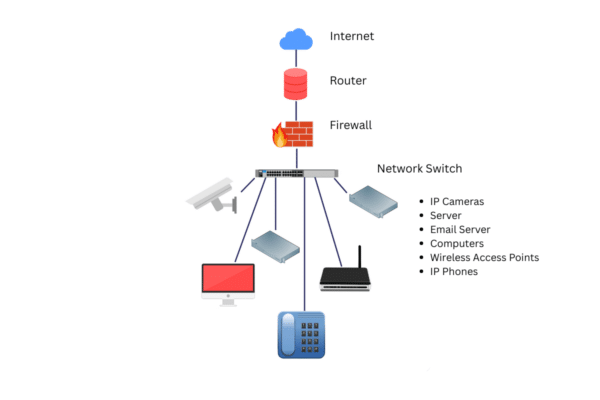
Although this process may appear simple, the underlying architecture determines performance outcomes. In other words, the difference between residential and business WiFi is not just speed; rather, it is intentional design. Because organizations rely on stable connectivity, properly engineered networks handle peak demand without degrading performance.
Business WiFi vs. Business Internet: What’s the Difference?
Business internet refers to the bandwidth delivered by your internet service provider (ISP). In contrast, business WiFi refers to the internal wireless network that distributes that connection throughout your office.
For example, an organization may purchase high‑speed fiber internet. However, if the internal wireless network is poorly designed, users may still experience slow connections, dropped calls, or coverage gaps. On the other hand, a properly engineered business WiFi system ensures that available bandwidth is distributed efficiently, securely, and consistently across users and devices.
In short, internet speed determines how much data enters your building, while WiFi design determines how effectively that data reaches employees and guests. Therefore, upgrading bandwidth alone does not always resolve performance issues.
Indicators of Organizational Complexity
As organizations grow in operational complexity, wireless infrastructure must evolve accordingly. While smaller environments may function on basic equipment, expanding operations introduce structural demands that require intentional design and governance.
Organizations typically benefit from business WiFi architecture when they:
In these environments, wireless infrastructure becomes more than connectivity; instead, it serves as a foundational layer of operational stability, security, and performance management. Therefore, business WiFi represents an architectural evolution rather than a reactive upgrade.
Common Misconceptions About Business WiFi
"Business WiFi just means faster internet."
Although speed matters, it represents only one factor. Stability, security, traffic prioritization, and scalability often matter more than raw bandwidth. As a result, organizations that focus solely on speed may overlook deeper infrastructure concerns.
"A stronger router will fix everything."
In reality, network performance depends on overall design, access point placement, segmentation strategy, and security configuration. Therefore, replacing a single device rarely resolves systemic issues.
"If it works most of the time, it's fine."
Intermittent instability often signals architectural limitations. In many cases, performance issues stem from signal interference, insufficient access point density, improper bandwidth allocation, or outdated firmware. Consequently, resolving WiFi challenges usually requires evaluating the full network design rather than replacing individual components.
Why Proper Network Design Matters
Business WiFi affects:
When organizations implement well‑engineered wireless systems, they reduce downtime and improve user experience. Moreover, they create a scalable foundation for future growth. Conversely, poorly designed networks introduce unnecessary risk and operational friction.

Organizations that treat WiFi as infrastructure rather than a utility typically experience fewer disruptions and greater operational efficiency. Therefore, strategic network planning delivers measurable business value over time.



Trusted By Leading Chicago Industries
See why our clients trust us to handle their most critical IT needs.
"GO managed the whole process and pushed on our vendors to find other means to get things done."
- Donna C. -
Office Leasing
"They explained technology so it was easy to understand-this gave me the confidence to make intelligent and effective business decisions."
- Earl F. -
Law Firm
"They have a huge range of knowledge which is great for problem solving our everyday issues with technology at a school."
- Brigid O. -
Education
Frequently Asked Questions About Business WiFi
What is the main purpose of business WiFi?
The primary purpose is to provide secure, reliable, and scalable wireless connectivity that supports business‑critical applications and multiple simultaneous users. In addition, properly designed systems help protect data and maintain performance under load.
Is business WiFi more secure than home WiFi?
Yes. Business WiFi systems include advanced firewall protection, network segmentation, intrusion detection, and centralized management capabilities. As a result, they provide stronger safeguards than consumer equipment.
How many access points does a small office need?
The required number depends on square footage, building materials, device density, and usage patterns. Therefore, organizations often conduct professional site assessments to determine proper placement and quantity.
Can business WiFi support guest networks?
Yes. Business WiFi systems isolate guest traffic from internal networks using VLAN segmentation and secure access controls. Consequently, organizations protect sensitive internal data while still offering visitor connectivity.
Does business WiFi require ongoing management?
Yes. For optimal performance and security, organizations should continuously monitor and update their systems. In many cases, managed IT providers oversee network health and security to ensure long‑term stability.
Is business WiFi the same as business internet?
No. Business internet refers to the external bandwidth connection, whereas business WiFi distributes that connection internally. While internet speed affects overall capacity, WiFi design determines how reliably users access that capacity.
PART OF THE BUSINESS WIFI RESOURCE CENTER
Explore the Business WiFi Learning Path
Follow the structured guides below to evaluate, compare, and plan your business WiFi infrastructure.
Evaluating Your Business WiFi Infrastructure?
If your organization relies on cloud platforms, video conferencing, or secure client data access, your wireless network plays a critical role in daily operations.
While educational guides provide clarity, every environment presents unique variables — including building layout, device density, compliance requirements, and performance expectations.
A structured assessment can identify bottlenecks, security gaps, and scalability limitations before they disrupt productivity.
Our Simple 3-Step Process
to Streamlined IT Solutions
Ready to simplify your IT? To begin, give us a quick call to schedule your technology assessment. From there, we'll explore your needs and explain how our managed IT services can help. So, get started now and see how easy it is to work with us!
Contact us
To get started, reach out to schedule a quick consultation and discuss your IT needs.
tech assessment
Next, we evaluate your current setup to identify areas for improvement.
onboarding
Finally, we seamlessly implement tailored solutions to enhance your IT infrastructure.